Build a clear invoice book
Create invoices individually or import them in bulk, then track due, overdue, disputed and paid work from the same operational view.
Receivaro walkthrough
Follow the complete journey from sending an invoice to automatic reminders, customer responses and payment—without losing the history between them.
Watch the walkthrough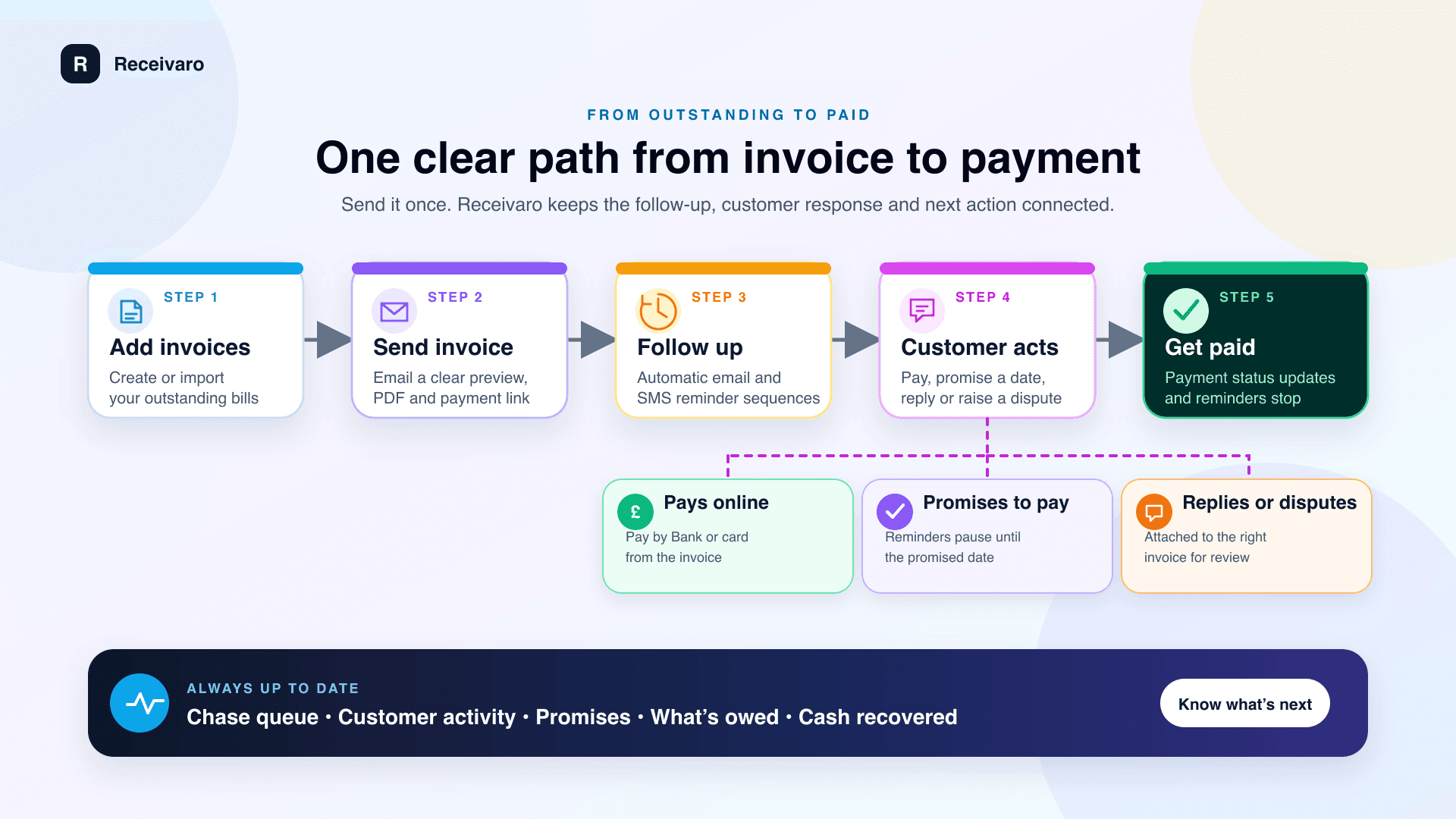
Watch Receivaro in action
See the invoice book, Chase queue and dashboard working together to show what is owed and what needs attention next.
What the walkthrough covers
Receivaro brings the invoice record, follow-up history and customer response together, so you can see what happened and decide what should happen next without rebuilding the story from spreadsheets and inboxes.
Create invoices individually or import them in bulk, then track due, overdue, disputed and paid work from the same operational view.
Use the Chase queue to see what needs attention, send email or SMS reminders, and keep replies and promises attached to the right invoice.
Give customers a direct route to pay by bank or card, record confirmed payments, and stop future reminders when the balance is settled.
The sample workspace uses fictional business data and is safe to explore without signing up. When you are ready to use your own invoices, create a private workspace with a secure email link and start a 30-day free trial.
Ready to bring it together?
Try Receivaro free for 30 days. No credit card is required, and you can explore the live sample workspace first.